

Inspiration
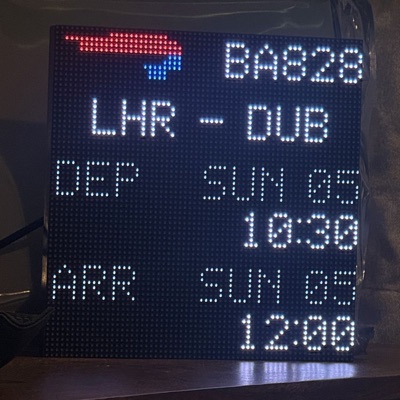
While scrolling on Instagram I saw a similar commercial product, an LED board which tracks overhead planes using freely available ADS-B data. I liked the idea, but wanted expanded functionality to cover my own upcoming flights, as well as other smart home data.
I began development while the hardware was in the post, and wanted a way to preview the output of the screen, so I asked an AI to generate me a web preview of what this 64x64px display would look like. The Tailwind dashboard was then born, and I saw benefit in offloading the rendering to a server, while the board itself simply reads the pixel array.
Design spec
- Automatic upcoming flight detection.
- Automatic "in-air" detection with flight duration readout.
- "Downroute" mode to show weather and time in the destination.
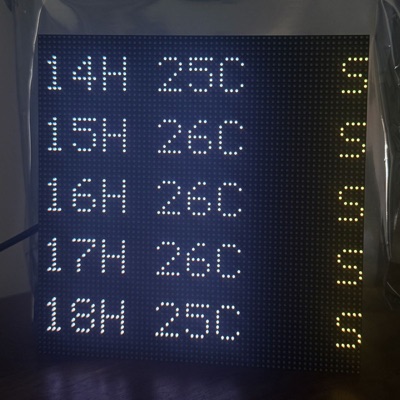
- Ability to add screens in rotation, including the initial ideas of weather and Sonos Now Playing.
- User-customisable endpoints for flight detection, calendar entries, weather location and other data.
The backend
I self-host the backend because for a small-scale project it makes the most sense. There aren't any ongoing monthly usage fees, only a minimal amount of electricity, and it gives me full control over the stack I use.
It isn't without its drawbacks though, primarily uptime and security maintenance: both of those are on me to keep up with.
Chosen stack
Domain → Tunnel → Reverse proxy → Tailwind Docker container
Cloudflare
The domain was already bought through Cloudflare, so DNS is managed there too. The DNS entry points to a Cloudflare tunnel into my network, which avoids setting up DDNS or exposing my home IP address.
Cloudflare also allows for a Zero Trust login screen in front of the application, but I chose not to use it for this project as I want to scope dashboard access for each user to their own board.
GitHub
I'm using Git for version control, and GitHub as the repo my Docker container is pulled from. This has proved really simple: I can commit and push from VS Code on my laptop, then hit "re-deploy" in my container management program to update the backend.
Currently I'm only using a main branch, but as I gift these boards to friends and family I'll set up a dev branch so I can test changes without impacting my production instance.
Fastify & Node.js
I'm using TypeScript-based tooling as a single language on the backend, for these benefits:
- Structure forces good habits.
- Bugs are caught at compile time, instead of when already deployed.
- A lot of the web and many apps are built on TypeScript, so it's a good, modern beginner language to get to grips with.
Auth
Boards are hardcoded with a bearer token, which is scoped to the /api/<board>/frame endpoints.
Originally I handled single-user auth myself, with a plaintext username and a hashed password set in my Docker environment variables. As I added new users, or users wanted to add themselves, I realised this wouldn't scale.
Multi-user auth is now handled by Clerk, which is free for my use case and has plenty of documentation on implementing it in different environments.
When setting up a Tailwind board for the first time, onboarding automatically creates an account scoped to only that board's settings endpoints. I can choose which boards existing users have access to with an API endpoint authorised only for the admin account.
Data sources
Upcoming flight info
This comes from the Flighty app, which has the paid feature of exporting all flights to a calendar. The .ics link is pulled every hour and parsed for info such as the person taking the flight, the flight route and the time and date.
F1 stats
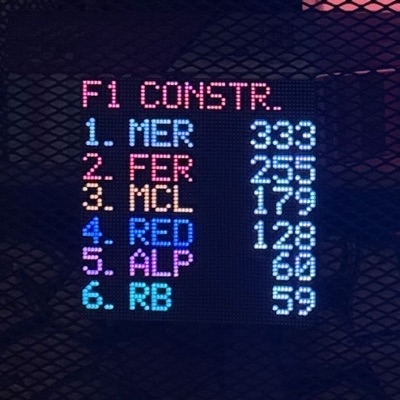
These are kindly provided by F1API.dev. I pull current/drivers-championship, current/constructors-championship and current/last/race to display three standings cards with the top six drivers and constructors in order.
Sonos Now Playing
This was actually one of the easier integrations to build, as Sonos players announce themselves on the network using multicast. They use a SOAP API, which the board polls for Now Playing info every 20s. The board POSTs the data to the server, which renders it into a card.
POST /api/<board>/sonos/now-playing HTTP/1.1
Host: tailwind.themisto.app
Authorization: Bearer BOARD_TOKEN
Content-Type: application/json

{ isPlaying, trackTitle?, artist?, artworkUrl? }
The server also sets an updatedAt column in the database, and the card is rendered only when there's data fresher than 90s. In my testing this was a happy medium: it allows for any failed board → Sonos or board → server requests, and drops the card when music is paused.
As I generally play music in a single room, or all the rooms together, I decided for simplicity the board would pick up the first Sonos to reply to the SOAP request. However, Sonos players generally reply with null even when they're not playing, so I needed some validation logic to move on to the next player if, for example, my bedroom replies with null but the kitchen has actual track info.
The hardware
Controller board: Interstate 75 W
- Dual-core Arm M33 running at 150MHz
- 520kB SRAM
- 4MB flash storage
- Built-in Wi-Fi 4 and Bluetooth 5.4
You can run programs on this board in C++ or MicroPython, and I picked the latter.
Display: 64x64 HUB75 LED matrix
- Uses the HUB75 communication protocol and pins, common in large video walls.
- 20W max power draw, easily covered by USB-C power adapters, so nothing external is needed.
- In my testing, 8W was common for bright screens and 2W for text only (both at 75% brightness).
API test
Test my API with a GET request to the healthz endpoint. If it's up, you should get a JSON response with the status and server build timestamp.
Press Send to test the API response.Future aspirations
Audit data validation for API endpoints: prevent injection attacks. Most endpoints already have this, but I want to make sure they're all covered.
Rate limiting: prevent brute-force attacks or abuse of the API endpoints, with rates set comfortably above the designed poll frequency of the boards and web dashboard.
On-device processing: I've begun experimenting with the board doing its own rendering, which comes with some key advantages:
- Free public API endpoints (weather, F1 stats and so on) can be polled by the board itself, reducing reliance on my own server.
- Less server overhead. Each additional board currently needs another set of pixels rendered server-side. That's small now, at less than 1% CPU, but at commercial scale it could become an unnecessary cost.
- Animated screens, such as a pulsing status bar. With server-side rendering, pixels are drawn and fetched by the board only once every 20 seconds, which rules out animation.
Migrate to Better Auth: mainly to support passkeys and hardware keys for future-proof authentication. That's a paid-only feature with Clerk, which I currently use.